Hindi, Marathi and amounts in words
Shabd writes Hindi, Marathi and other Indian languages in Unicode, so the text opens, searches and prints right on any computer or phone. Most of the commands are in Review ▸ Indian Languages: phonetic typing, Kruti Dev conversion and the font converter. Amounts in words and dates are in Insert ▸ Text.
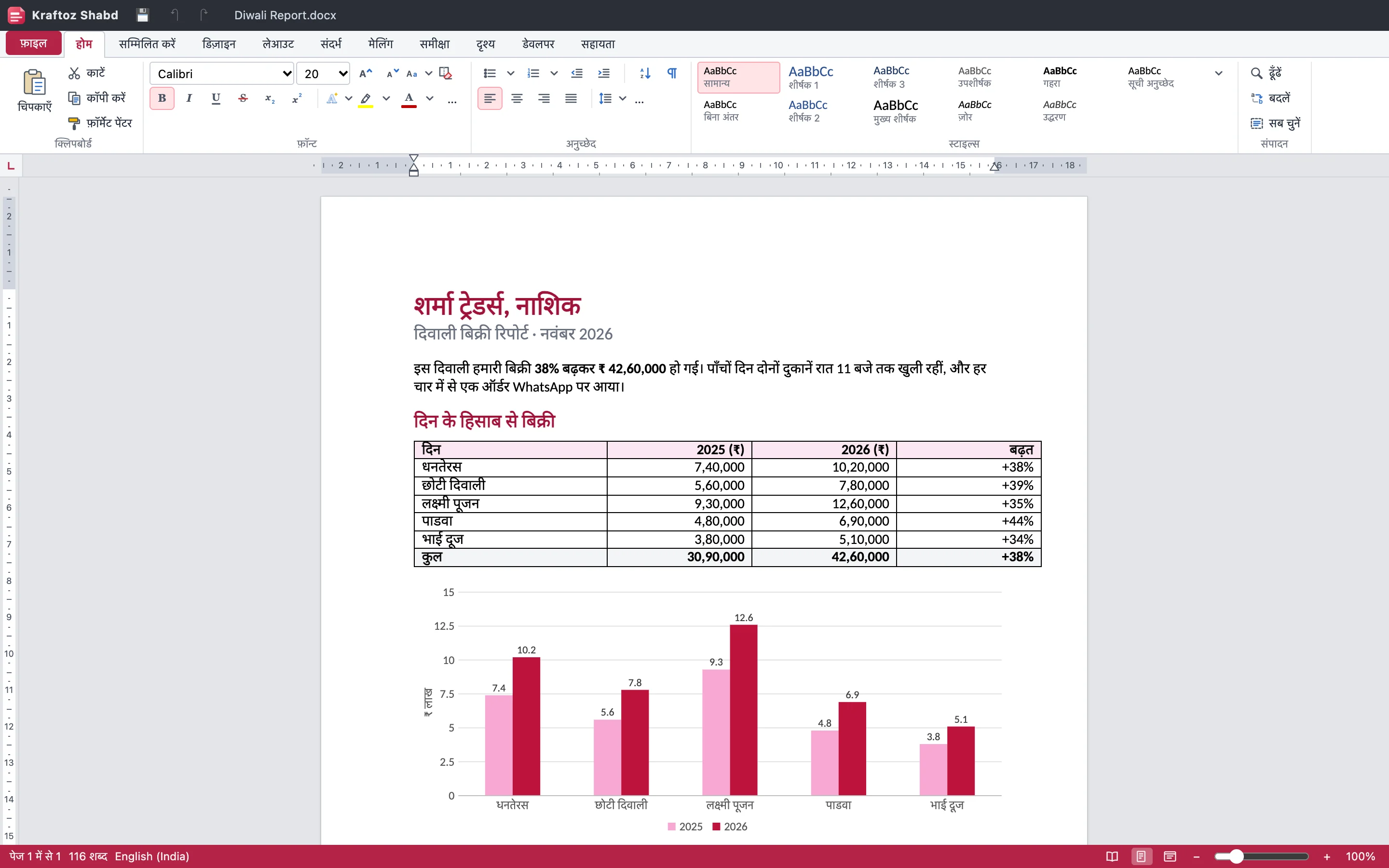
Typing with your computer's Hindi or Marathi keyboard
If your computer already has a Hindi or Marathi keyboard turned on, type in Shabd as you would anywhere else. Shabd takes the Devanagari letters the keyboard gives it. Phonetic typing must be off for this (see below): its menu's first item, Off — as the keyboard types, leaves the keys to your keyboard.
Phonetic typing
Phonetic typing turns English letters into an Indian script as you type, with no keyboard to set up. Type namaste and Shabd writes नमस्ते.
Turning it on and off
- Click Review ▸ Indian Languages ▸ Phonetic Typing, or press Alt+Shift+H (⌥⇧H on a Mac). The same button or keys turn it off.
- While it's on, the status bar at the bottom shows the script, for example अ हिन्दी · मराठी. Click it to turn phonetic typing off.
- When you turn it on, a tip shows what it does in the chosen script:
namaste → नमस्ते. - Shabd remembers the setting in this browser, so it's still on next time you open Shabd.
Choosing the script
Click the ▾ under Phonetic Typing and choose the script. The menu offers:
| Menu item | Languages |
|---|---|
| हिन्दी · मराठी | Devanagari (Hindi, Marathi, Sanskrit, Nepali) |
| বাংলা | Bengali / Assamese |
| ਪੰਜਾਬੀ | Gurmukhi (Punjabi) |
| ગુજરાતી | Gujarati |
| ଓଡ଼ିଆ | Odia |
| தமிழ் | Tamil |
| తెలుగు | Telugu |
| ಕನ್ನಡ | Kannada |
| മലയാളം | Malayalam |
Choosing a script also turns phonetic typing on. Alt+Shift+H then turns on the script you used last.
Which letters to type
The ▾ menu's last item, How to Type Phonetically…, opens the table of letters.
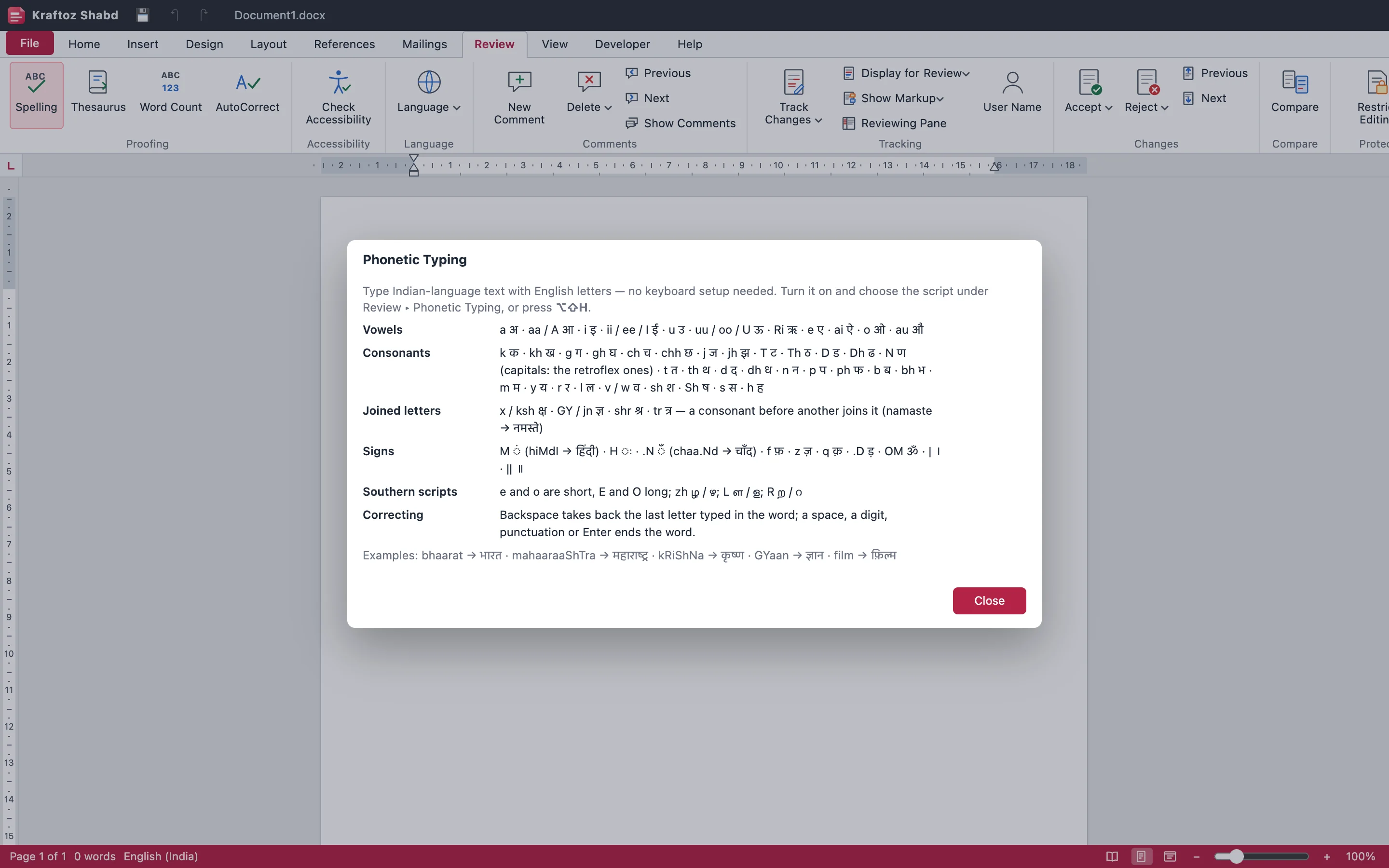
| Type | You get |
|---|---|
| a, aa or A, i, ii or ee or I, u, uu or oo or U, Ri, e, ai, o, au | अ, आ, इ, ई, उ, ऊ, ऋ, ए, ऐ, ओ, औ |
| k, kh, g, gh, ch, chh, j, jh | क, ख, ग, घ, च, छ, ज, झ |
| T, Th, D, Dh, N (capitals) | ट, ठ, ड, ढ, ण |
| t, th, d, dh, n | त, थ, द, ध, न |
| p, ph, b, bh, m | प, फ, ब, भ, म |
| y, r, l, v or w, sh, Sh, s, h | य, र, ल, व, श, ष, स, ह |
| x or ksh, GY or jn, shr, tr | क्ष, ज्ञ, श्र, त्र |
| M (anusvara) | ं, as in hiMdI → हिंदी |
| .N (chandrabindu) | ँ, as in chaa.Nd → चाँद |
| H | ः |
| f, z, q, .D | फ़, ज़, क़, ड़ |
| OM | ॐ |
| | and || | । and ॥ |
A consonant typed before another joins it, so namaste gives नमस्ते with स्त joined. More examples:
| Type | You get |
|---|---|
| bhaarat | भारत |
| mahaaraaShTra | महाराष्ट्र |
| puNe | पुणे |
| kRiShNa | कृष्ण |
| GYaan | ज्ञान |
| film | फ़िल्म |
In the southern scripts, e and o are short and E and O are long. zh, L and R give the letters ழ, ள and ற (and their Malayalam forms).
Correcting a word
- Backspace takes back the last letter you typed in the word, and Shabd writes the word again without it.
- A space, a digit, punctuation or Enter ends the word. After that, Backspace deletes as usual.
Where it works
Phonetic typing works wherever you type in the document: the page, headers and footers, footnotes and text in shapes. It also works with Track Changes on. Shortcuts with Ctrl or Alt still work while it's on. Boxes in dialogs, such as Find, take English letters as usual.
AutoCorrect doesn't change words while phonetic typing is on.
Fonts for Hindi and Marathi
The font list on the Home tab has these fonts for Devanagari text:
| Font | Good to know |
|---|---|
| Mangal, Nirmala UI | Unicode Hindi fonts that many computers have |
| Noto Sans Devanagari | Comes with Shabd, so it shows on every computer |
| Mukta, Hind, Tiro Devanagari Hindi | Free fonts. If your computer doesn't have one, Shabd gets it from Google Fonts the first time you pick it, and keeps it in this browser |
| Kruti Dev 010 | An old, non-Unicode font. Use it only when a press or office asks for Kruti Dev |
If Hindi text is in a font that has no Devanagari letters, such as Calibri, Shabd shows it in a Devanagari font from the computer, so you can still read it.
The Leave Application (Hindi) template uses Nirmala UI.
Converting Kruti Dev text to Unicode
Kruti Dev, DevLys, Walkman, Akruti and Chanakya are old Hindi fonts. They draw Hindi letters over English keys. Without the font, सेवा में shows up as lsok esa. Such text can't be searched or spell-checked, and it can't be read on a phone. Shabd turns it into Unicode Hindi or Marathi.
Converting a whole document
- Open the .docx file in Shabd (File ▸ Open…, or drag it onto the page).
- If the document has text in one of these fonts, a bar above the page names the font and asks whether to convert it.
- Click Convert to Unicode. Every piece of old-font text becomes Unicode, in the Mangal font. The status bar says how many pieces of text were converted.
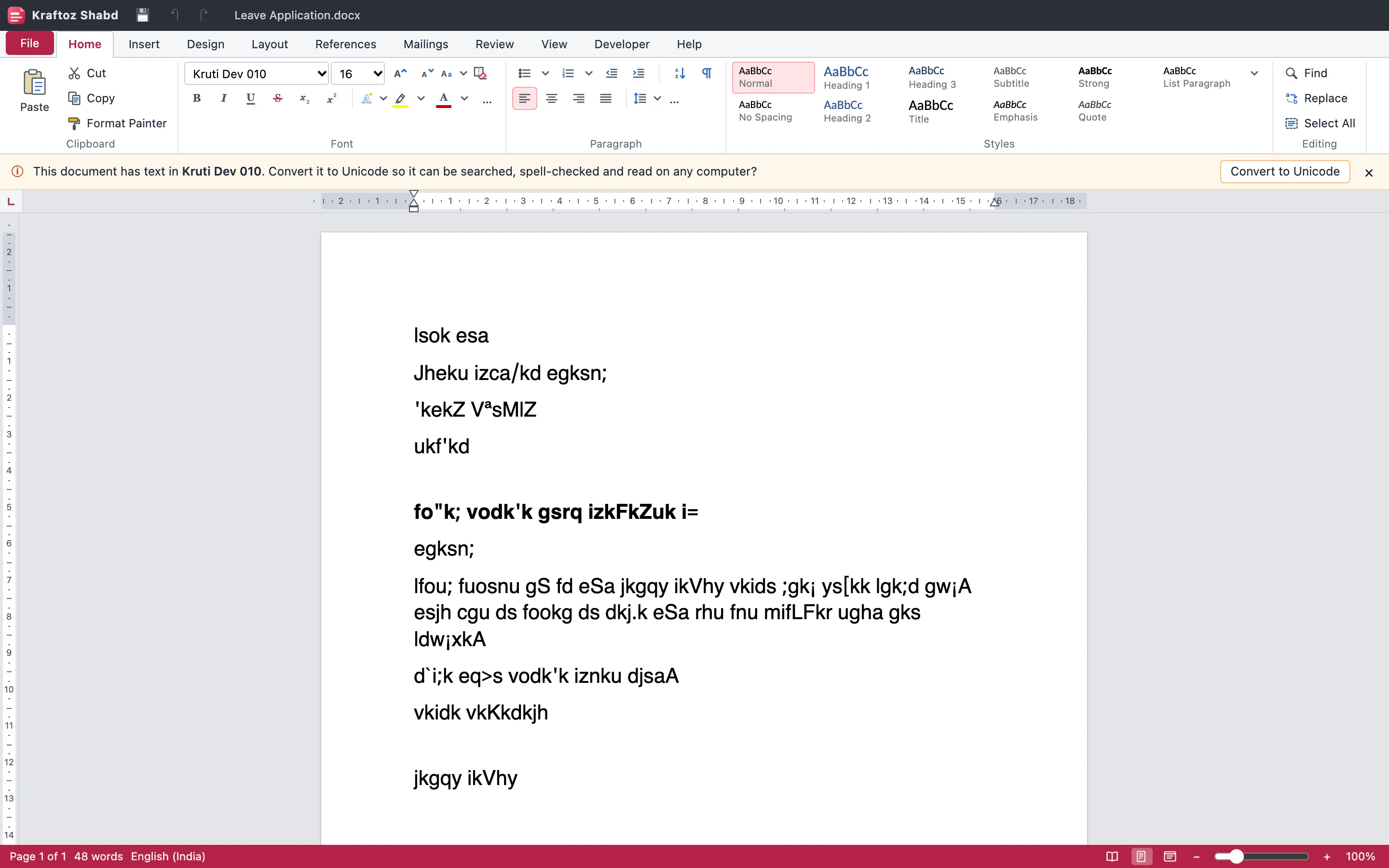
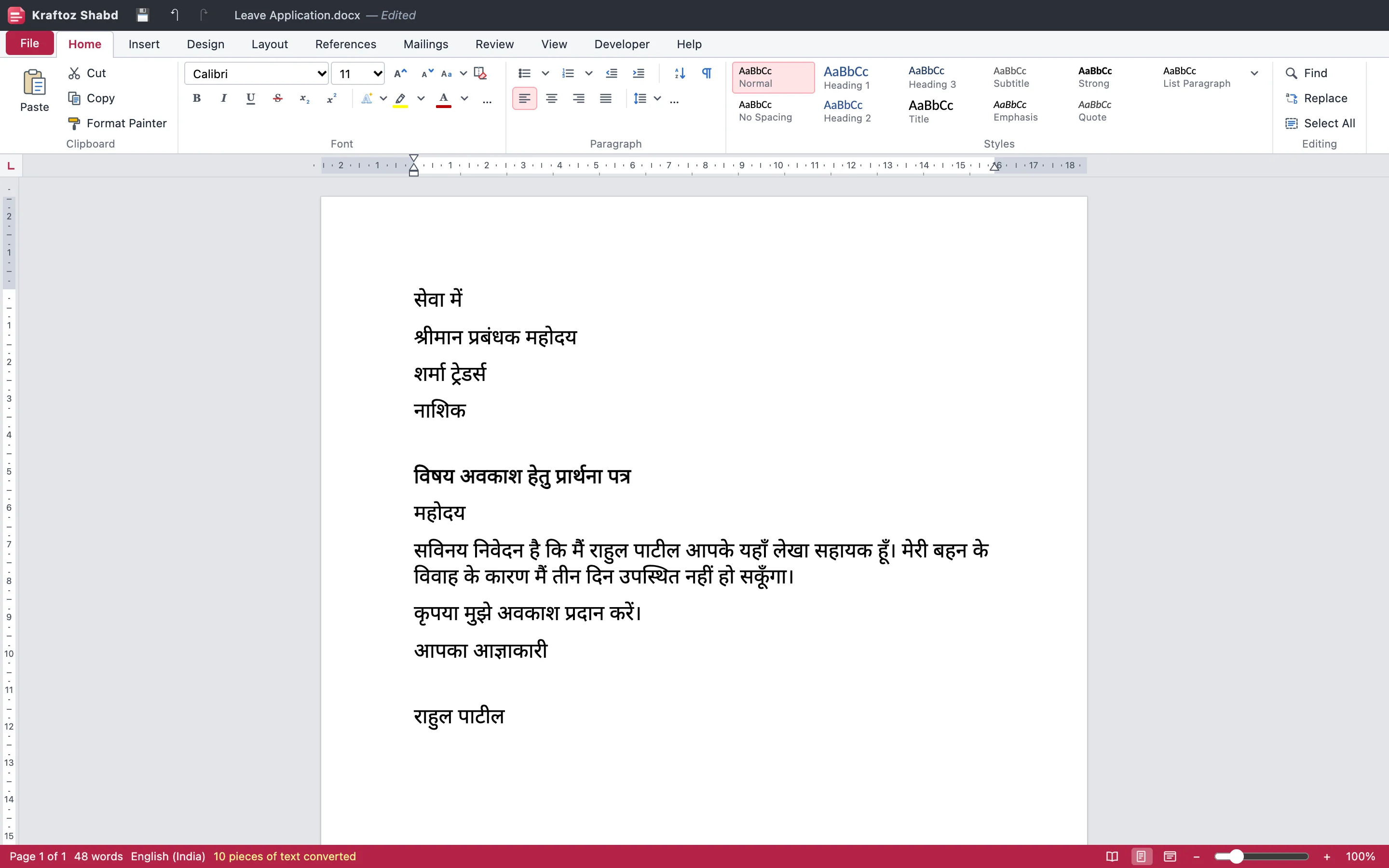
You can also convert without the bar: with nothing selected, click Review ▸ Indian Languages ▸ Convert to Unicode. Shabd converts all the text in Kruti Dev, DevLys, Walkman, Akruti or Chanakya fonts.
Note
If the file also has something Shabd can't show yet, Shabd shows a bar about that instead, and the Kruti Dev bar doesn't appear. Use Review ▸ Indian Languages ▸ Convert to Unicode.
Converting part of the text
- Select the text you want to convert.
- Click Review ▸ Indian Languages ▸ Convert to Unicode. Shabd converts the selected text that is in an old Hindi font.
- If Shabd says there's no text in Kruti Dev, Akruti or Chanakya here, the text's font name doesn't say which font it was typed in. Click the ▾ under Convert to Unicode and choose it yourself.
The ▾ menu has:
| Menu item | What it does |
|---|---|
| Kruti Dev / DevLys / Walkman → Unicode | Converts the selected text as Kruti Dev |
| Akruti → Unicode | Converts it as Akruti |
| Chanakya → Unicode | Converts it as Chanakya |
| Unicode → Kruti Dev | Turns Unicode Hindi back into Kruti Dev text, in the Kruti Dev 010 font |
| Converter… | Opens the font converter (below) |
With a ▾ choice and text selected, Shabd converts all the selected text, whatever its font. With nothing selected, it converts only the text in old Hindi fonts.
Undo (Ctrl+Z) takes a conversion back.
Converting copied text in the Converter
Use the converter for text from an e-mail, a web page or another program.
- Click Review ▸ Indian Languages ▸ Converter. The Hindi / Marathi Font Converter opens.
- In Convert, choose the old font: Kruti Dev / DevLys → Unicode, Akruti → Unicode, Chanakya → Unicode, or Unicode → Kruti Dev.
- Paste the text into Text. The converted text shows in Result as you type or paste.
- Click Insert to put it in the document where the cursor is, or copy it from Result.
| Typed in Kruti Dev | After conversion |
|---|---|
| lsok esa | सेवा में |
| Jheku izca/kd egksn; | श्रीमान प्रबंधक महोदय |
| d`i;k eq>s vodk'k iznku djsaA | कृपया मुझे अवकाश प्रदान करें। |
| fnukad | दिनांक |
Unicode back to Kruti Dev
Some presses and government offices still ask for text in Kruti Dev. Select the Hindi text, click the ▾ under Convert to Unicode and choose Unicode → Kruti Dev. The text changes to Kruti Dev letters in the Kruti Dev 010 font. It shows as Hindi only on a computer that has Kruti Dev 010.
Note
The converter gets two marks wrong. In Kruti Dev, ] stands for a comma and % for a colon, but Shabd leaves ] as it is and turns % into the visarga ः. Going the other way, Unicode → Kruti Dev leaves commas and colons as they are, and in Kruti Dev they show as ए and रू. Check commas and colons after converting.
The same converter is in Kraftoz Ganit and Kraftoz Alekh, for old-font text in spreadsheets and designs.
Amounts in words
Insert ▸ Text ▸ Amount in Words writes an amount in rupees the way cheques, bills and letters write it, with lakhs and crores.
- Click where the words should go. If the amount is already in the text, select it: Shabd puts the number in the box for you, and the words replace the selection.
- Click Insert ▸ Text ▸ Amount in Words.
- Type the Amount (₹). You can type commas (1,25,000) and paise after a point (125000.50).
- Choose the Language: English, हिंदी or मराठी. The words show under the box.
- Click Insert.
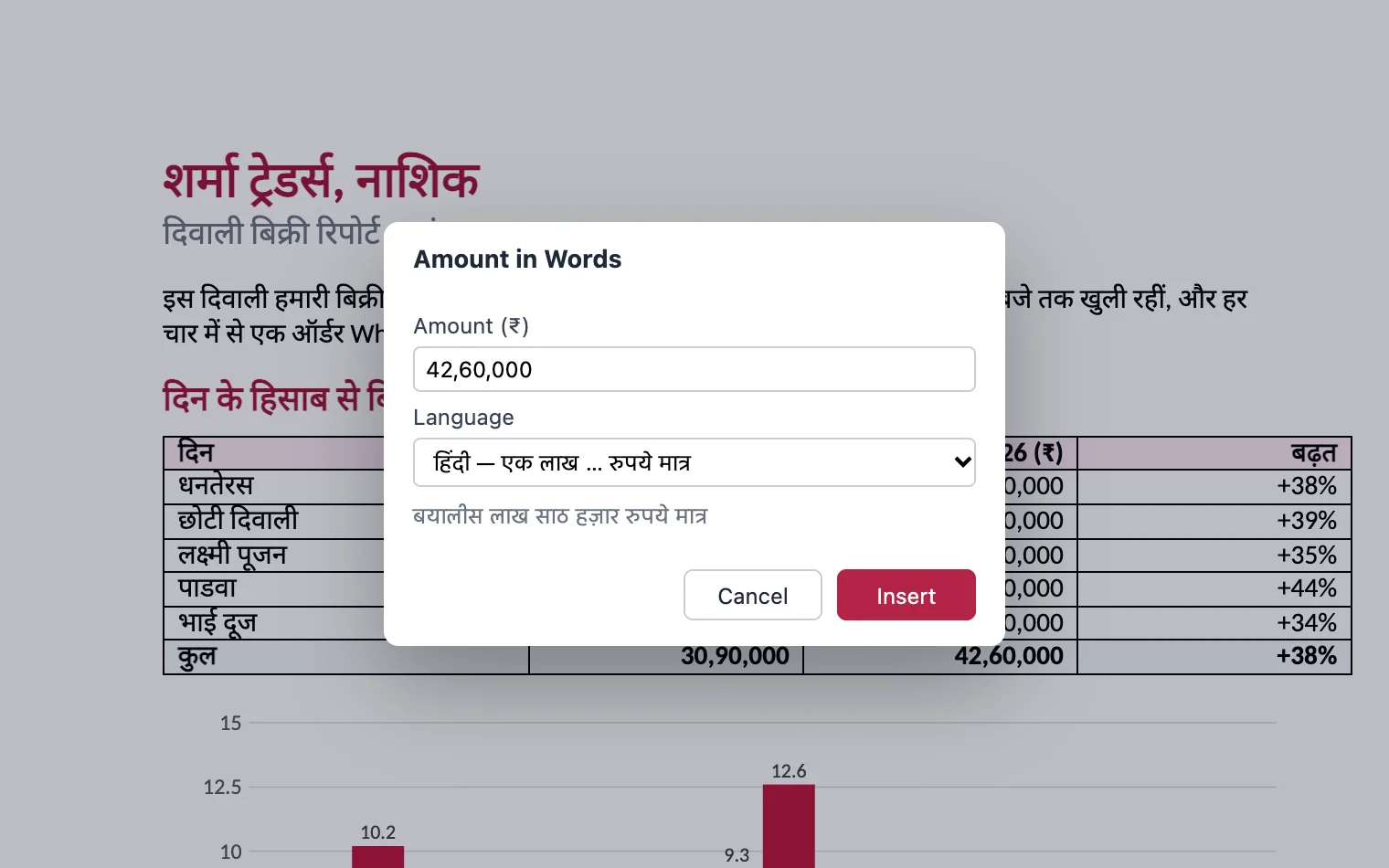
| Amount | English | हिंदी | मराठी |
|---|---|---|---|
| 1 | Rupees One Only | एक रुपया मात्र | एक रुपया फक्त |
| 11800 | Rupees Eleven Thousand Eight Hundred Only | ग्यारह हज़ार आठ सौ रुपये मात्र | अकरा हजार आठशे रुपये फक्त |
| 125000 | Rupees One Lakh Twenty Five Thousand Only | एक लाख पच्चीस हज़ार रुपये मात्र | एक लाख पंचवीस हजार रुपये फक्त |
| 2575.75 | Rupees Two Thousand Five Hundred Seventy Five and Paise Seventy Five Only | दो हज़ार पाँच सौ पचहत्तर रुपये और पचहत्तर पैसे मात्र | दोन हजार पाचशे पंच्याहत्तर रुपये आणि पंच्याहत्तर पैसे फक्त |
| 15000000.01 | Rupees One Crore Fifty Lakh and Paise One Only | एक करोड़ पचास लाख रुपये और एक पैसा मात्र | एक कोटी पन्नास लाख रुपये आणि एक पैसा फक्त |
Paise are rounded to two places. The words are ordinary text: if you change the amount, insert the words again.
The GST Tax Invoice template has an Amount in words line for this.
Dates, day first
Insert ▸ Text ▸ Date & Time opens Date and Time, with today's date in these formats, day first as dates are written in India. On 25 November 2026 they are:
| Format | Example |
|---|---|
| Day-month-year with dashes | 25-11-2026 |
| Day/month/year | 25/11/2026 |
| Day, month name, year | 25 November 2026 |
| With the weekday | Wednesday, 25 November 2026 |
| Hindi month | 25 नवंबर 2026 |
| Marathi month | 25 नोव्हेंबर 2026 |
| Month first | 11/25/2026 |
| Time | 3:45 pm (the time now) |
Choose one and click OK. Shabd types the date as ordinary text, so it doesn't change on another day.
Numbered lists in Devanagari digits
To number a list १. २. ३., select the paragraphs, click the ▾ next to Numbering on the Home tab, and choose १. २. ३. in the Numbering Library. Lists in .docx files that use Hindi numbering show the same way.
Page numbers are always in 1, 2, 3 digits. See Page layout, headers and footers.
Checking spelling in Hindi or Marathi
Shabd uses the browser's own spelling checker. To check Hindi or Marathi:
- Click Review ▸ Language ▸ Language and choose हिंदी (Hindi) or मराठी (Marathi). The status bar shows the language.
- Turn on Review ▸ Proofing ▸ Spelling (F7) if it's off.
The browser underlines words only if it has a dictionary for that language. See Review, track changes and protection.
Menus in Hindi or Marathi
Shabd's menus, ribbon and dialogs can be in Hindi or Marathi.
- Click File ▸ Language….
- Choose English, हिंदी or मराठी, and click OK.
Shabd reloads with the new menus. Your document stays open, and its text isn't changed or translated. Shabd remembers the choice in this browser.
In Hindi, for example, the Review tab is समीक्षा and Indian Languages is भारतीय भाषाएँ. In Marathi they are पुनरावलोकन and भारतीय भाषा.