Hindi, Marathi and other Indian scripts
Alekh writes Hindi, Marathi and eight other Indian scripts with correct conjuncts and vowel signs, on screen, in PDF and in curves. It comes with fonts for each script, has phonetic typing that needs no keyboard setup, and converts text from old Kruti Dev, Akruti and Chanakya fonts to Unicode.
Scripts Alekh supports
| Script | Languages |
|---|---|
| Devanagari | Hindi, Marathi (also Sanskrit and Nepali) |
| Bengali | Bengali, Assamese |
| Gurmukhi | Punjabi |
| Gujarati | Gujarati |
| Odia | Odia |
| Tamil | Tamil |
| Telugu | Telugu |
| Kannada | Kannada |
| Malayalam | Malayalam |
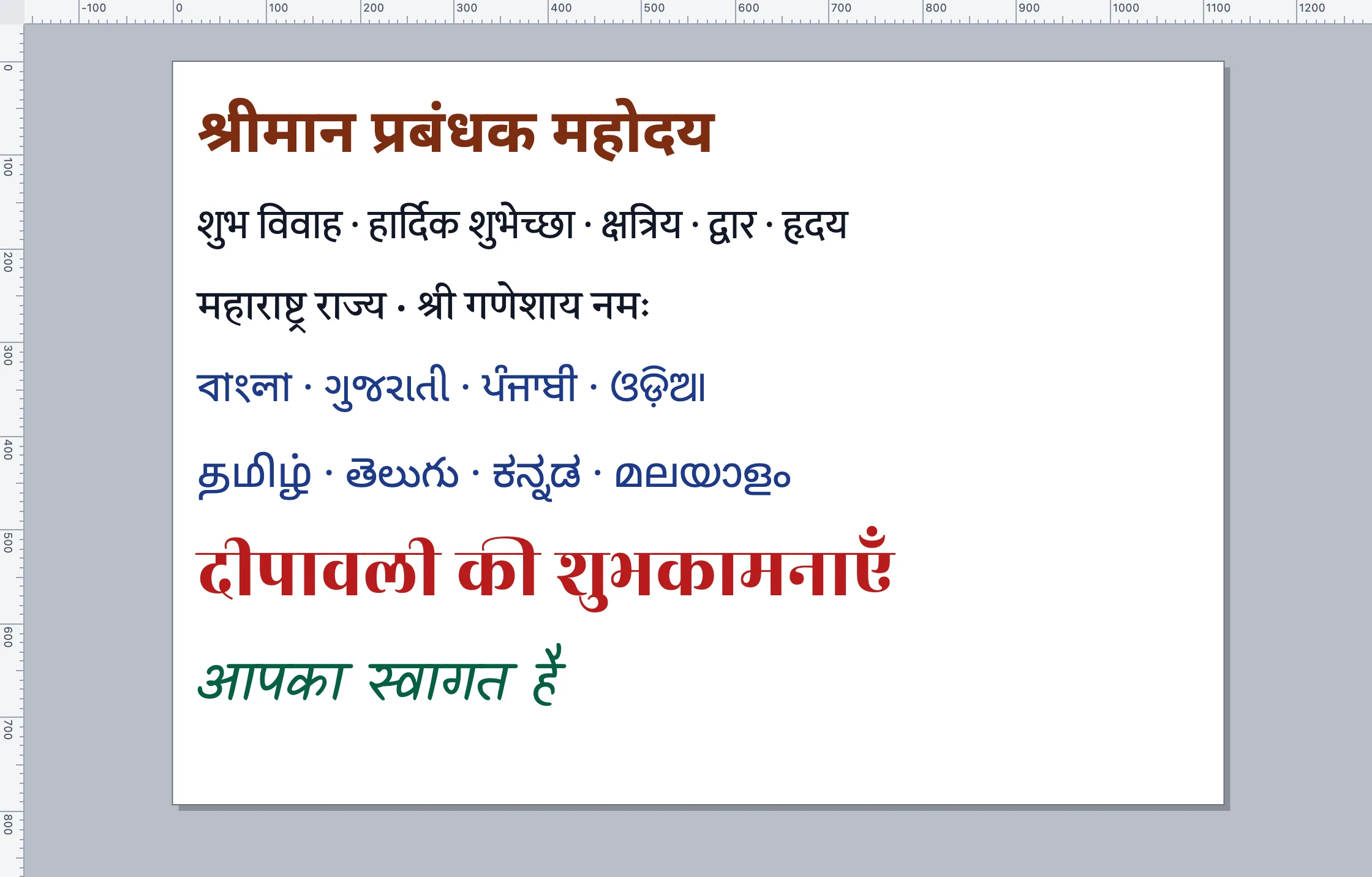
Fonts that come with Alekh
These fonts are included with Alekh, so a design looks the same on every computer:
| Script | Fonts |
|---|---|
| Devanagari | Noto Sans Devanagari, Noto Serif Devanagari, Mukta, Hind, Kalam (handwriting), Rozha One (display), Tiro Devanagari Hindi (serif) |
| Bengali | Noto Sans Bengali, Noto Serif Bengali, Hind Siliguri |
| Gurmukhi | Noto Sans Gurmukhi, Noto Serif Gurmukhi |
| Gujarati | Noto Sans Gujarati, Noto Serif Gujarati, Hind Vadodara |
| Odia | Noto Sans Oriya, Noto Serif Oriya |
| Tamil | Noto Sans Tamil, Noto Serif Tamil, Hind Madurai |
| Telugu | Noto Sans Telugu, Noto Serif Telugu, Hind Guntur |
| Kannada | Noto Sans Kannada, Noto Serif Kannada |
| Malayalam | Noto Sans Malayalam, Noto Serif Malayalam |
To see them, open Text ▸ Fonts… and choose Indian scripts (included) in the filter. To see every font that writes a script, including your own and installed fonts, choose the script under Writes, for example Hindi · Marathi (Devanagari). Each font's row shows the scripts it writes.
If the font you chose doesn't have a letter, for example an English font used for Hindi text, Alekh shows that letter in the included Noto font for its script. The PDF and curves use the same font, so what you see is what prints.
You can add other Unicode fonts for these scripts with Text ▸ Fonts… ▸ Add font files…. See Fonts.
Typing Indian scripts
With your computer's keyboard
Any Hindi, Marathi or other Indian keyboard or input method set up on your computer works in Alekh, including transliteration input tools. Click with the Text tool and type as you would anywhere else.
Phonetic typing
Phonetic typing lets you type Indian-script text with English letters, without setting up a keyboard. Type namaste and Alekh writes नमस्ते.
- Select the Text tool, or select some text.
- On the property bar, under Typing, choose the script, for example हिन्दी · मराठी (phonetic). As the keyboard types turns phonetic typing off.
- Type.
Alt+Shift+H turns phonetic typing on and off. While it is on, the status bar shows अ and the script's name. The ? button next to Typing shows all the keys.
| Type | You get |
|---|---|
| Vowels | a अ · aa or A आ · i इ · ii, ee or I ई · u उ · uu, oo or U ऊ · Ri ऋ · e ए · ai ऐ · o ओ · au औ |
| Retroflex consonants | Capital letters: T ट · Th ठ · D ड · Dh ढ · N ण · Sh ष |
| Joined letters | x or ksh क्ष · GY or jn ज्ञ · shr श्र · tr त्र. A consonant before another joins it: namaste नमस्ते |
| Signs | M ं (hiMdI हिंदी) · H ः · .N ँ (chaa.Nd चाँद) · f फ़ · z ज़ · q क़ · .D ड़ · OM ॐ · | । · || ॥ |
| Southern scripts | e and o are short, E and O long; zh ழ / ഴ; L ள / ള; R ற / റ |
More examples: bhaarat भारत, kRiShNa कृष्ण, GYaan ज्ञान, film फ़िल्म. In Tamil, tamizh gives தமிழ்.
Backspace takes back the last letter typed in the word. Space, punctuation or Enter end the word.
How conjuncts and vowel signs are shaped
Indian scripts need shaping: half letters join into conjuncts (क्ष, त्र, द्ध), the vowel sign ि moves before its consonant, and the reph र् moves to the top of the next letter (धर्म). Alekh shapes the text with each font's own rules.
- On screen: the text is shaped as you type. The cursor and selection move over a whole conjunct or a letter with its vowel sign as one unit.
- In PDF: Alekh shapes the text itself and embeds the font (Embed fonts in Publish to PDF, on by default), so conjuncts and matras come out as on screen, also on a press or another computer.
- In curves: Object ▸ Convert to Curves uses the same shaping, for files sent to a cutter or another design program.
Alekh keeps text in standard Unicode form. A letter with a nukta, such as क़, is the same text whether it was typed or pasted, so Find and Replace finds it either way.
Note
OpenType features chosen in Text ▸ OpenType Features… don't go into PDF. The script's own shaping (conjuncts, matras) always does.
Numbers in Indian digits
For numbered lists in १, २, ३ or the digits of another script, use Text ▸ Bullets and Numbering… and choose a style under Indian digits. See Bullets and numbering.
Old Hindi and Marathi fonts (Kruti Dev and others)
Many older files and customer texts are typed in fonts such as Kruti Dev. In those fonts the text is stored as English letters that the font draws as Devanagari, so it shows as Hkkjr in any other font. Alekh converts such text to Unicode, and Unicode text back to Kruti Dev. The commands are in Text ▸ Hindi / Marathi Fonts.
Converting text on the page
- Select the text objects. They can be a mix of old-font and Unicode text.
- Choose Text ▸ Hindi / Marathi Fonts ▸ Convert Legacy Font Text to Unicode.
Alekh finds each text's old font by its name and uses the right table:
| Font name contains | Converted as |
|---|---|
| Kruti, DevLys, Walkman | Kruti Dev |
| Akruti | Akruti Dev |
| Chanakya | Chanakya |
When some of the selected text is in such a font, only that text is converted. When none is, all the selected text is converted as Kruti Dev. The converted text is set in Noto Sans Devanagari. Paragraph settings stay, but character formatting inside the text (a word in bold or another colour) is cleared, so check it afterwards.
The Legacy Font Converter
For text copied from a document or a message, use Text ▸ Hindi / Marathi Fonts ▸ Legacy Font Converter….
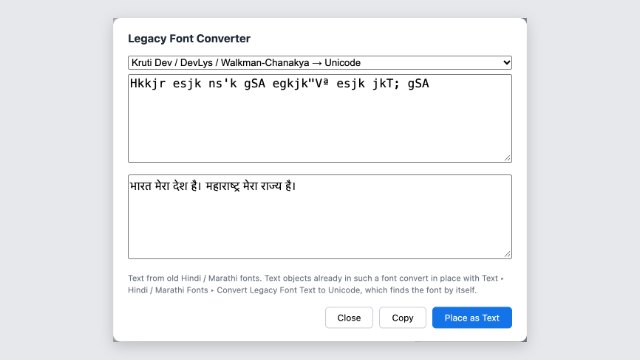
- Choose the conversion:
- Kruti Dev / DevLys / Walkman-Chanakya → Unicode
- Akruti Dev (Priya, Bhaskar, Yogini…) → Unicode
- Chanakya → Unicode
- Unicode → Kruti Dev
- Paste or type the text in the top box. The converted text appears in the box below.
- Click Place as Text to put it on the page (or into the text you are typing), or Copy to copy it.
Examples of Kruti Dev text and what it becomes:
| Kruti Dev | Unicode |
|---|---|
| lsok esa | सेवा में |
| Jheku izca/kd egksn; | श्रीमान प्रबंधक महोदय |
| Hkkjr | भारत |
Converting to Kruti Dev
Some printers and government offices still ask for Kruti Dev text. Select the text and choose Text ▸ Hindi / Marathi Fonts ▸ Convert Text to Kruti Dev. The text is set in the font Kruti Dev 010.
Note
The Kruti Dev 010 font doesn't come with Alekh. Install it on your computer, or add its file under Text ▸ Fonts… ▸ My fonts, to see the converted text correctly.
Note
Commas and colons are not converted correctly yet. In Kruti Dev text, ] is a comma and % is a colon, but converting to Unicode leaves ] as it is and turns % into the visarga ः. Converting to Kruti Dev leaves a comma as ,, which the Kruti Dev font shows as ए. After converting, check the punctuation and correct it with Text ▸ Find and Replace Text….
Menus in Hindi and Marathi
Alekh's menus and windows can be in English, Hindi or Marathi. Go to Window ▸ Language and choose English, हिंदी or मराठी. Alekh saves your drawing and restarts in that language.
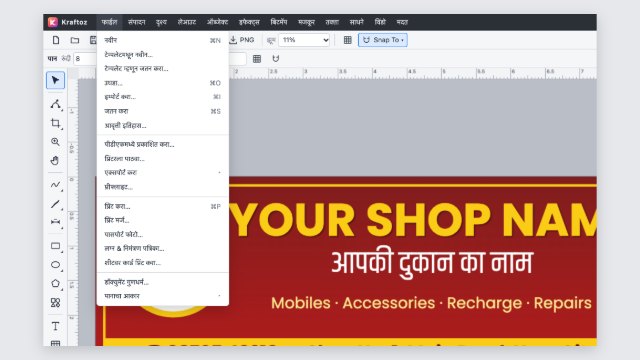
The language of the menus doesn't affect your designs: you can make Hindi text with English menus, and English text with Marathi menus.
Other Indian-language helpers
- Wedding and invitation cards: File ▸ Wedding & Invitation Cards… makes a card with traditional wording in Marathi, Hindi or English, ready to fill in.
- Calendars: Tools ▸ Calendar Maker… makes calendars in English, Marathi or Hindi. See Photos and bitmaps.
- Missing fonts: when a design's Hindi or Marathi font is missing, the Missing fonts window suggests the included Noto font for that script. See Missing fonts.